

Showing posts with label Facebook. Show all posts
Showing posts with label Facebook. Show all posts


 There are many complaints regarding the theft of photos from facebook mainly
photo of girls.How to avoid the theft of photos
There are many complaints regarding the theft of photos from facebook mainly
photo of girls.How to avoid the theft of photos
Steps:
Be Friend With The People You Know.And when uploading pictures set the image visibility from Public to Friends as bellow
Be Friend With The People You Know.And when uploading pictures set the image visibility from Public to Friends as bellow

If you want to be friend with anonymous people create a new list named Friends and add those whom you know personally to it
To add someone to a list go to their profile hover over the Friend button and select a list.
To create a new list click Show All List->New List

And then while uploading images set the image visibility from Public to the list you created eg:-Close Friends
Some Privacy Tips For Facebook
If you want more privacy and want to share things
with your Friends then
Go to Privacy Setting
Go to Privacy Setting
Change from Public to Friends as bellow

Hope these helped you.Just for biginerz
 Today,
Facebook announces the launch of phish@fb.com, an email
address available to the public to report phishing attempts against
Facebook. Phishing is any attempt to acquire personal information,
such as username, password, or financial information via impersonation or
spoofing.
Today,
Facebook announces the launch of phish@fb.com, an email
address available to the public to report phishing attempts against
Facebook. Phishing is any attempt to acquire personal information,
such as username, password, or financial information via impersonation or
spoofing.
By
providing Facebook with reports, we can investigate and request for browser
blacklisting and site takedowns where appropriate.In some cases, Facebook will
be able to identify victims, and secure their accounts.
You
might ask yourself how to spot suspected phishing emails. Facebooks Partner at
the Anti-Phishing Working Group have put together
some helpful tips to avoid being deceived by these messages:
1.
Be
suspicious of any email with urgent requests for login or financial
information, and remember, unless the email is digitally signed, you can't be
sure it wasn't forged or 'spoofed'
2. Don't use the links
in an email, instant message, or chat to get to any web page if you suspect the
message might not be authentic or you don't trust the sender, instead navigate
to the website directly
This
new reporting channel will compliment internal systems they have in place to
detect phishing sites attempting to steal Facebook user login information.
The internal systems will notify faceboook team, so that they can gather
information on the attack, take the phishing sites offline, and notify
users. Affected users will be prompted to change their password and
provided education to better protect themselves in the future.
As
a reminder, you can visit www.facebook.com/hacked if you think your account
may be compromised(Ha3ked).
 We are happy to launch our new Facebook Group named RealHackers.In At this moment we have decided to give a Hacking Ebook The Hackers Underground Handbook to the members.It is one of the best books to learn hacking, for the beginners.
Join Group
What This Hacking Ebook Includes?
A. Introduction
1. How can I use this eBook?
2. What is a hacker
3. Hacker Hierarchy
4. What does it take to become a hacker?
B. Programming
1. Do I really need it?
2. Where should I start?
3. Best way to learn
C. Linux
1. What is it?
2. Choosing a distribution
3. Running Linux
4. Learning Linux
D. Passwords
1. Password Cracking
2. Phishing
3. Countermeasures
4. More Programs
E. Network Hacking
1. Foot printing
2. Port Scanning
3. Banner Grabbing
4. Searching for Vulnerabilities
5. Penetrating
6. Countermeasures
F. Wireless Hacking
1. Scanning for Wireless Networks
2. Cracking WEP
3. Packet Sniffing
4. Countermeasures
G. Windows Hacking
1. NetBIOS
2. Cracking Windows Passwords
3. Countermeasures
H. Malware
1. Definitions
2. ProRat
3. Countermeasures
I. Web Hacking
1. Cross Site Scripting
2. Remote File Inclusion
3. Local File Inclusion
J. Conclusion
1. Congratulations
2. Keep Learning
How To Get This Book?
Just join our Group and add your friends to it.Book will be distributed after Group reaches 1000 members
Note:There will be a special price for the one who add more Friends to the Group
Disclamer:
7/8/2012-7/9/2012


….*.¸.*’….*.[[336842623036575]] [[336842623036575]] [[126216480723638]] *’.*.[[336842623036575]] [[336842623036575]] [[126216480723638]] *’….[[336842623036575]] [[336842623036575]] [[126216480723638]] …*.[[336842623036575]] [[336842623036575]] [[126216480723638]] .`*.¸¸…….\\\||///.……..\\||//.……….……….\|/..[[363460793698354]] ………..V…. |

(¯`v´¯).`·.¸.·´ [[126216480723638]] ¸.·´¸.·´¨) ¸.·*¨)(¸.·´ (¸.·´ .·´ ¸ .[[312004515520386]] / [[239173782833076]] [[312004372187067]] [[312004515520386]] ..[[312004515520386]] / [[363460793698354]] [[363460793698354]] /¦\ [[312004515520386]] .[[312004515520386]] _| |__| |_ [[312004515520386]] |

¦.(¯` [[312004515520386]] ´¯)´´¯`•°*”˜˜”*°•. [[126216480723638]] ¦.`*.¸.*.•°*”˜˜”*°•.[[126216480723638]] ¦.•°*”˜˜”*°•.[[126216480723638]] * ¸ [[336842623036575]] [[363460793698354]] [[312615488792622]] your message [[312615488792622]]
|

 Facebook scams are spreading daily.Now latest one is verify your account scam apps.
There are hundreds of people working full time to help protect your account and
keep scams off Facebook.
As well as 1000 of people working to make scams day by day
As well as 1000 of people working to make scams day by day
What It Does?
First when you click on the application link it redirect to page as bellow
When you click on the Click Here To Verify button a new tab opens

When you click Log In With Facebook button it will acess your private datas of you and your friends

The worst thing behind it is that if you allow this apps it sents App request to all your friends
Lets See What All This App Can Acess?
- Name
- Profile Pics
- Gender
- Friend List
- Photos
- User Id
- And all things you have kept public as well as private
Your Location:
- Address
- Phone Numbers
- Mail Id’s
- Other Geographical Details
Other Facebook Activities:
- Posting To Your Wall
- Posting From Your Id To Friends Wall
- Share Something On Your As Well As Your Friends wall
So don’t fall in these traps and be alert to scams.Bellow are some official facebook tips to improve your security
Some Official Security Tricks From Facebook
1. Know how to spot a scam
If an offer looks too good to be true, it probably is. Think twice before you click on a link for free airline tickets or other common scams.
2. Choose a one-of-a-kind password
Is your Facebook password different than your email password? If not, please reset your password today.
3. Confirm your mobile number
If you forget your password, we'll be able to text you a new one. To make sure we can reach you, confirm your mobile number.
 Yeah if you receive a message from your friend it will be displayed under messages.But if you receive a message from a stranger it will not be shown in your default message folder.
Accees Messages From Strangers:
Log To Fb
From Left Menu Click Messages
Click On Other
There You Can Find The Message From Others

To access Other Messages directly Click Here
The main part is that we don’t notice the messages from others.because the Other tab is not highlighted.
Image Credits:WimWauters
 Yeah there may be situations like you forgot to logout from a Cyber café and Colleges.
If so there is a chance that someone misuses your FaceBook Account.So lets see what to do in these situations
Steps:
Log in to Facebook from Home Computer
Log in to Facebook from Home Computer
Click Account Settings -> Security


You can see the Active Sessions
End all Sessions by clicking End Activity

Hola Your Account Is Safe

Today I am disussing about a way to get money just by liking Facebook Pages.
If you are a Facebook Addict this is the perfect way to earn real cas from ur Facebook Account
If you are a Facebook Addict this is the perfect way to earn real cas from ur Facebook Account
Let’s Begin
Go to the site bellow and Sign Up
Go to the site bellow and Sign Up
Confirm your Email
Login to ur facebook account and site I provided
Click on Earn tab and select Facebook
Like the Pages provided

How To Redeem Ur Points:
Click on Sell Coins from left menu
Enter your Paypal address and redeem
Point System:
Earlier I have disussed about how to add pre defined photos to facebook chat
ie Mr Bean, Heart ect. Now I am telling you how to put your picture on facebook chat
If you have not read my earlier post on How To Put Images On Facebook Chat Box Click Here To read it
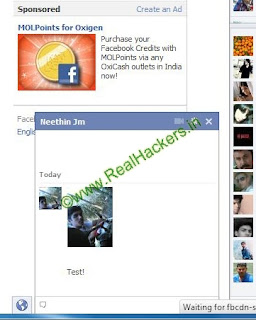

ie Mr Bean, Heart ect. Now I am telling you how to put your picture on facebook chat
If you have not read my earlier post on How To Put Images On Facebook Chat Box Click Here To read it
Go to the bellow website:
- Visit Website
- Click the “Choose File” Button and choose an image from your computer
- Enter The Captcha
- Click the “ Upload Now” button

- Copy the code you gets after uploading
- Paste the code to Facebook Chat Box
Get Your images in Facebook chat as seen bellow!


 Deleting friends one by one can be annoying and irritating.Yes now lets learn how to Delete Multiple Friends on Facebook.Now Lets do it wit help of some Scripts

Software Requirements
FireFox 4 or later
Download
Grease Monkey Add On
Download
Start:
First Install FireFox
Then Download Grease Monkey Add On
Install add on and Restart Firefox
Then Grease Monkey Icon will be visible on firefox(If itz not active click icon)

Go to the download page(Click Install Script) and install the script
Install Script

Now a new popup window will ask you to Install Script
Click Install

Installation Ends Here!
Begin Deletion Now!
Go to ur Facebook Profile -> Friends
Wait till script loads
Hover over one of ur friends name(Where Unfrend Really Comes)
Then Refresh the page
Now you will see Check Boxes aginst friends as seen bellow
Select the friends u want to Unfriend

Click on the Arrow Button as bellow

Select Highlight Only Button
Now it will begin Deletion
Note: Be sure u select correct friends


[[f9.laugh]]
[[f9.sad]]
[[f9.angry]]
[[f9.sleepy]]
[[f9.shock]]
[[f9.kiss]]
[[f9.inlove]]
[[f9.pizza]]
[[f9.coffee]]
[[f9.rain]]
[[f9.bomb]]
[[f9.sun]]
[[f9.heart]]
[[f9.heartbreak]]
[[f9.doctor]]
[[f9.ghost]]
[[f9.brb]]
[[f9.wine]]
[[f9.gift]]
[[f9.adore]]
[[f9.angel]]
[[f9.baloons]]
[[f9.bowl]]
[[f9.cake]]
[[f9.callme]]
[[f9.clap]]
[[f9.confused]]
[[f9.curllip]]
[[f9.devilface]]
[[f9.lying]]
[[f9.rofl]]
[[f9.billiard]]
[[f9.cakepiece]]
[[f9.rosedown]]
[[f9.shutmouth]]
[[f9.shy]]
[[f9.silly]]
[[f9.tongue1]]
[[f9.fastfood]]
[[f9.ring]]
[[f9.plate]]
[[f9.candle]]
[[f9.party]]
[[f9.sad]]
[[f9.angry]]
[[f9.sleepy]]
[[f9.shock]]
[[f9.kiss]]
[[f9.inlove]]
[[f9.pizza]]
[[f9.coffee]]
[[f9.rain]]
[[f9.bomb]]
[[f9.sun]]
[[f9.heart]]
[[f9.heartbreak]]
[[f9.doctor]]
[[f9.ghost]]
[[f9.brb]]
[[f9.wine]]
[[f9.gift]]
[[f9.adore]]
[[f9.angel]]
[[f9.baloons]]
[[f9.bowl]]
[[f9.cake]]
[[f9.callme]]
[[f9.clap]]
[[f9.confused]]
[[f9.curllip]]
[[f9.devilface]]
[[f9.lying]]
[[f9.rofl]]
[[f9.billiard]]
[[f9.cakepiece]]
[[f9.rosedown]]
[[f9.shutmouth]]
[[f9.shy]]
[[f9.silly]]
[[f9.tongue1]]
[[f9.fastfood]]
[[f9.ring]]
[[f9.plate]]
[[f9.candle]]
[[f9.party]]


